Temporary File Sharing
Meta Description: Master temporary file sharing in 2026. Learn how expiring file links and secure temporary uploads protect your digital privacy without requiring account registration.
In an era where personal data leaks, unauthorized data scraping, and corporate surveillance are at an all-time high, how you handle digital document transfers matters more than ever. Traditional cloud storage platforms encourage you to upload files permanently, store them indefinitely, and link them to your personal identity through registered accounts.
In 2026, privacy-conscious individuals and professionals are shifting toward temporary file sharing. By using expiring file links and performing a secure temporary upload, you can transfer critical documents, large media files, and sensitive project deliverables without leaving a permanent digital footprint.
This comprehensive guide breaks down everything you need to know about temporary file sharing, why expiring links are essential for your privacy, and how platforms like Rediafile allow you to share large files securely with zero signup requirements.
What is Temporary File Sharing?
Temporary file sharing is an ephemeral method of digital data transfer where uploaded files remain available for download only for a specified duration or until a download threshold is met. Once the expiration criteria are reached, the platform automatically purges the file from its servers.
Unlike traditional cloud drives (like Google Drive or Dropbox) where files sit in your storage quota until manually deleted, temporary upload services operate on a zero-retention or short-retention framework.
- Short-Term Server Storage: Files are stored temporarily (e.g., 24 hours to 7 days).
- Expiring File Links: Shareable URLs are programmatically invalidated after the retention period or maximum download limit is reached.
- Automatic Data Sanitization: Physical file records are permanently wiped from the cloud storage cluster upon expiration.
Why Permanent File Links Are a Security Risk in 2026
When you create a permanent shareable link on standard cloud drives, you open several security vectors:
- Link Creep & Forgotten Access: Over time, users forget which public links they have created. A link shared with a contractor two years ago might still be active today.
- Data Scraping & Search Indexing: Unprotected, long-lived URLs can occasionally end up indexed by web crawlers or leaked in public forums.
- Identity Tracking: Standard cloud providers require account creation, tying every file transfer to your name, email address, IP address, and browser fingerprint.
- Third-Party Data Mining: Free accounts on major platforms often come with terms of service that allow automated scanning of uploaded files for content moderation, ad targeting, or AI training models.
By leveraging a secure temporary upload, you eliminate the long-term risk of exposure. When the file expires, the attack surface vanishes completely.
Core Pillars of Secure Temporary Uploads
Not all temporary file platforms are created equal. When selecting a service for private file transfers in 2026, look for these four core features:
1. Registration-Free Access
True anonymity starts at upload. If a platform demands your email address, phone number, or social login before you can transfer a file, your privacy is compromised from step one. Platforms like Rediafile One-Page Uploader bypass signup forms entirely.
2. End-to-End Transit Encryption
Your data must be shielded while traveling across the internet. Modern temporary file sharing relies on SSL/TLS protocol encryption to encrypt payload data during transfer, protecting it against middle-mile interception or Wi-Fi eavesdropping.
3. Automated Expiring File Links
Configurable or default expiration timers ensure that files don't sit on cloud nodes indefinitely. Standard default availability windows (such as 7-day storage) strike the ideal balance between recipient convenience and server privacy.
4. Direct Unrestricted Downloads
The recipient shouldn't have to navigate aggressive paywalls, captcha traps, or mandatory account creation just to download a file you sent them. A clean, direct download URL guarantees a smooth experience across desktop, tablet, and mobile devices.
Real-World Use Cases for Expiring File Links
- Freelancers & Agencies Delivering Client Work: Designers, video editors, and software developers routinely send massive deliverables (RAW footage, ZIP archives, design files) to clients. Once downloaded, expiring links keep handoffs organized and prevent outdated drafts from floating around.
- Students & Academics Submitting Homework: Submitting multi-gigabyte video presentations or research archives doesn't require permanent storage. Using a secure temporary upload guarantees the reviewer can grab the submission instantly.
- Remote Teams & Corporate Workspaces: Sending internal reports or spreadsheets over Slack/email can clog channels and expose confidential data. A short-lived link ensures members download assets securely before the cloud copy self-destructs.
- Personal Media Sharing Across Devices: Moving a 4K video from phone to desktop or sending a family photo album eliminates the friction of Bluetooth pairing, cables, or full cloud synchronization.
Step-by-Step: How to Send Files Up to 10GB with Rediafile
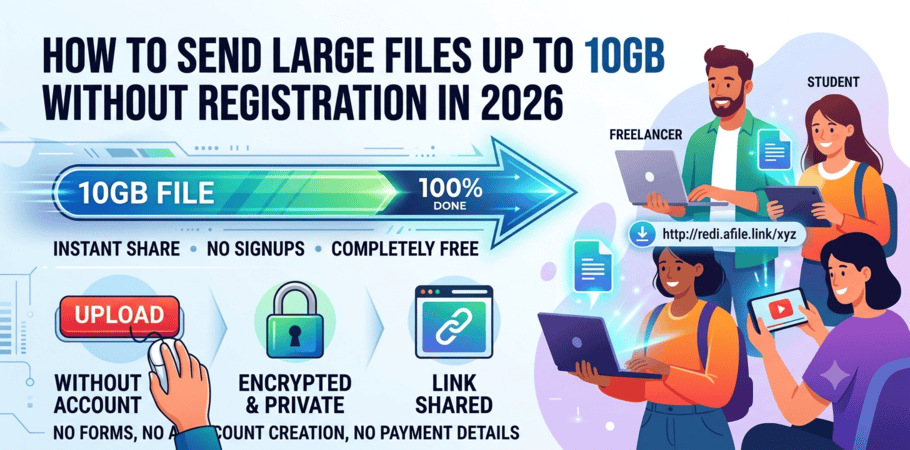
Rediafile provides a streamlined One-Page Temporary Uploader that lets you share large files—up to 10GB per upload—without creating an account, paying fees, or providing personal details.
Visit rediafile.com/one-page/ from any web browser on your phone, tablet, or desktop.
Click "Upload Your File" or drag and drop your files directly into the upload area. Rediafile supports ZIP, RAR, MP4, MOV, PDF, ISO, and high-resolution images.
Rediafile routes your transfer through high-speed global CDN nodes with uncapped bandwidth, ensuring your upload finishes in record time.
Once the upload reaches 100%, copy your direct download URL. Send this link to your recipient via email, messaging app, or team chat.
Feature Comparison: Rediafile vs. Traditional Cloud Platforms
FeatureRediafile Temporary UploadTraditional Cloud DrivesFree Upload AggregatorsAccount Required?❌ No Signup Needed⚠️ Mandatory Registration❌ NoMax File Size (Free)⚡ Up to 10GB⚠️ 2GB - 5GB Tier Limits❌ 100MB - 1GBAutomated Expiry✅ Yes (7-Day Storage)❌ Manual Deletion Only⚠️ Aggressive (<24h)Transfer Speed Caps⚡ Uncapped / High Speed CDN⚠️ Throttled Free Tiers❌ Heavily ThrottledRecipient Sign-Up❌ None Needed⚠️ Often Required❌ NoneEncryption (SSL/TLS)✅ Standard End-to-End✅ Standard⚠️ Ad-Supported / Insecure
Frequently Asked Questions (FAQ)
Once the file retention period (e.g., 7 days) expires, the download link is rendered inactive and the source file is automatically purged from Rediafile's cloud servers.
Yes! Rediafile is fully responsive and optimized for mobile browsers across iOS and Android. You can upload photos, videos, or documents directly from your phone's storage or camera roll without downloading an extra app.
Yes, provided the service utilizes SSL/TLS encryption during transit. Because temporary sharing removes the file after a short duration and doesn't tie it to a persistent account index, it minimizes long-term data leakage risks.
Rediafile's core one-page temporary file sharing tool is 100% free. You can send files up to 10GB without entering credit card details or registering for an account.
In 2026, convenience no longer requires sacrificing your data privacy. Send your first secure transfer with zero signup required.
Start Uploading on RediafileReady to Send Large Files?
Start uploading files up to 10GB now without registration, credit cards, or waiting queues.
Upload Your File Now